 ContinuousWave
 Whaler
 Moderated Discussion Areas
ContinuousWave: Small Boat Electrical
Vessel View--Mercury's New Electronics
Moderated Discussion Areas
ContinuousWave: Small Boat Electrical
Vessel View--Mercury's New Electronics


search | FAQ |
profile | register | author help
|
|
ContinuousWave Whaler Moderated Discussion Areas
ContinuousWave: Small Boat Electrical
Vessel View--Mercury's New Electronics
|
| Author | Topic: Vessel View--Mercury's New Electronics |
| jimh |
 posted 02-17-2006 08:38 PM ET (US)
posted 02-17-2006 08:38 PM ET (US)  
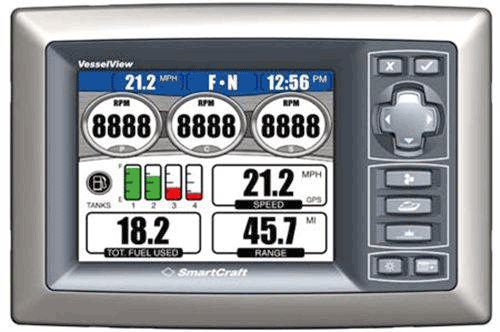
It was clear that Brunswick New Technologies Marine Electronics (BNTME) and Mercury Marine had something (electronic) up their sleeve to show at the Miami International Boat Show. VESSEL VIEW is the new brand name for the System View instrument of the SmartCraft instrument system. It would be very much appreciated if someone took a photograph or two of these devices at the Miami Boat Show and emailed them to me. ---------------------------- FOND DU LAC, Wis. (February 16, 2006) – True vessel integration has arrived. Mercury Marine revealed its all-new VesselView SmartCraft display as part of its booth opening at the Miami International Boat Show. VesselView was one of more than a dozen new Mercury products unveiled when the show opened its doors Feb. 16 at the Miami Beach Convention Center. SmartCraft is Mercury's exclusive control-area-network-based (CAN net) system that gives boaters an unprecedented level of information about their boats. SmartCraft links the propulsion control module on each engine to an advanced computer network so the driver can access all manner of data such as speed, engine rpm, cooling water temperature, water depth and fuel consumption via SmartCraft gauges and displays. Mercury Marine is the world leader in recreational marine propulsion with a full line of outboard, sterndrive and inboard engines, plus the marine industry's most extensive line of propellers, lubricants and parts and accessories. VesselView is different than previous SmartCraft user interfaces in that it has an advanced five-inch color screen that is direct-sunlight visible. It can monitor SmartCraft Networked peripheral items such as a generator, sounder, HVAC and inverter/charger. It is also fully compatible with the do-it-all NorthStar 8000i unit, which serves as fish finder, chart plotter, radar and infotainment. VesselView is all-new hardware, but it fits the same hole and footprint as Mercury's venerable System View interface. VesselView also features more buttons than previous interfaces, so it's very user intuitive, even in rough weather or higher speeds. As with all SmartCraft products, VesselView has been subjected to brutal testing. By the time it goes into production in the latter part of 2006, it will have undergone thousands of hours of validation, which far exceeds the industry norm for electronics. |
| jimh |
posted 02-17-2006 09:05 PM ET (US)
Further news on vessel electronics: The National Marine Manufacturer's Association awarded two Consumer Electronics category awards, one each to Simrad, for their WR20 Remote Commander, and to Brunswick New Technologies Marine Electronics, for their Northstar 8000i. SIMRAD's WR20 allows wireless control from anywhere on the vessel. It also includes a VHF Marine Band radio which the captain can carry with him at all times. NORTHSTAR's 8000i offers video, navigation, radar display, and CD player, as well as a network bridge to instrumentation networks such as the Mercury SmartCraft system. |
| jimh |
posted 07-09-2006 07:15 AM ET (US)
I am still looking for more information about the Vessel View display. Anyone with information, particularly a photograph of the device, please contact me via e-mail. Thanks. |
| royaloakwhaler |
posted 07-19-2006 03:09 PM ET (US)
Check this link out: http://boatpoint.ninemsn.com.au/portal/alias__boatpointau/tabID__200879/ ArticleID__1878097/DesktopDefault.aspx |
| jimh |
posted 07-19-2006 10:03 PM ET (US)
Finally:
|
| jimh |
posted 07-19-2006 10:12 PM ET (US)
Let's see how intuitive the icons used on the buttons are for the average user. What do you think the function of the buttons might be? Use the legends shown here to identify the controls:
|
| jimh |
posted 07-19-2006 10:19 PM ET (US)
Here are my guesses at what these icons for the controls mean: 1 = "X" --it looks similar to an icon used in some Windows applications which means to delete something. Perhaps a DEL or ESC key. 2 = "Check Mark"--all I can think of is perhaps it means "check" or "OK", thus it functions like an ENTER key 3 = "propelller"--probably leads to data about the propeller or engine 4 = "boat"--probably leads to data about the vessel 5 = (unrecognized)--the image is not very clear; I don't have a clue what this might be 6 = "sun"--a somewhat universal image for a brightness control 7 = (unrecognized)--the image is not very clear; I don't have a clue what this might be |
| royaloakwhaler |
posted 07-20-2006 11:06 AM ET (US)
1 Delete, No, esc, or back 2 OK, Yes, or enter 3 Engine Data: (from Smartcraft Racing) 4 Vessel Data: (from Smartcraft Racing) 5 Bouy? Nav map screen and sonar screen? 6 Brightness, contrast and backlight brightness 7 Monitor screen? off/on? Might toggle between screens. |
| jimh |
posted 07-21-2006 08:01 AM ET (US)
I like your interpretation of icon 5 as a buoy or navigational aid. This image of the Vessel View device looks like an artist's rendition, not an actual image of an actual device. It would be nice to see one of these in the flesh. Are they in production and being delivered to customers? |
| glen e |
posted 09-29-2007 06:44 PM ET (US)
I have had about 10 hours to play around with Mercury’s new Vessel View display package for SmartCraft engines. As far as I know, it is for engines released in 2007 and cannot be retrofitted. It carries a MSRP of $1,000. Is it worth it? Of course you know I’m gonna say yes. But it has reduced the amount of space for other gauges on the boat. It’s in a 5 x 7-inch display. Well thought out for the future in that all setting are saveable on the back by USB memory stick and there is an Ethernet connector for future integration. It’s much more than just the engines as it displays all tank levels, including waste and water, generator data if you have one, and navigation data. I think Yellowfin boats are using Vessel View exclusively for an all-Mercury data display. I would still add water pressure link gauges as I like that level of direct access. Let’s look at the unit: [Image has been removed by its owner.] The unit is totally waterproof and has a non reflective screen. Will it last? Time will tell. Mercury says the screen is resistant to scratches but so does every other display manufacturer and the many other coatings have had some problems with saltwater. A “navprotector” might be a good idea. The display is as clear as any daylight TFT screen from Raymarine, Furuno or Garmin. It is also color which has some real use in the functionality of the unit. The buttons on the side decide if you want, engine, vessel, navigation or environmental data to display. There are 18 screens that group data different ways. Here are the six I use most often: The first and probably most important screen is the engine data screen. Here for your review: [Image has been removed by its owner.] [Image has been removed by its owner.] [Image has been removed by its owner.] [Image has been removed by its owner.] [Image has been removed by its owner.]> <[Image has been removed by its owner.] Wish list: 1.The grey flange piece needs to be upgraded to chrome or colors to match the boat. The big Sea Ray owners are gonna need it in faux wood trim! I’ll report later what other things I find but for now, I don’t know anyone else that is this far ahead in instrumentation. |
| tombro |
posted 09-30-2007 06:10 AM ET (US)
Glen, Sal, thanks. Very interesting and informative. Too bad I can't retrofit my 2005 Verado for that function. |
| jimh |
posted 09-30-2007 10:10 AM ET (US)
I am glad to see the Vessel View has gone into production and is now available. It should be a popular option for owner's whose engines are compatible with it. I think the $1,000 price is very reasonable. Just a decent daylight-viewable display costs nearly that much. |
| RLSmith |
posted 09-30-2007 11:55 AM ET (US)
So would having Vessel View obviate the need for individual tachometer, fuel, temperature, water pressure, and battery gauges? Do the larger Outrages and Conquests now equipped with Verado and Vessel View only have Vessel View and not any other gauges? * I do not see any provision for displaying alarms on the screenshots. Is that hidden somewhere? * The screenshot in jimh's post 07-19-2006 10:03 PM appears to show a three engine configuration but there are only two "transmission" settings at the top center (one F, one N). What's with that? * How is fuel usage and remaining fuel measured - just based on the existing tank fuel level sender, or do the Mercury engines have something more sophisticated built in? * Is there any concern over a single point of failure resulting in complete instrumentation black-out? |
| glen e |
posted 09-30-2007 01:34 PM ET (US)
read my post again -there are 18 screens avail and yes all your questions, they have thought about...you can run 2 diesels or 3 gas engines off this unit...VV is used with some boats as the exclusive instruments , others like myself run redundant guages. Fuel level is is determined by tank sender and usage by the computer in the engine. all your answers can be found here: http://northamerica.mercurymarine.com/_media/pdfs/otherproducts/smartcraft_manuals/Vesselview_Manual.pdf |
| glen e |
posted 09-30-2007 02:24 PM ET (US)
Looks like it is std on the 32 outrage...from their website: 250 CXXL DTS Dual Mercury® Verado™ FourStrokes with Vessel View Display and power-assisted steering |
| nlwelch |
posted 07-25-2009 12:58 PM ET (US)
Technically VesselView can communicate with up to 4 engnes but it can only display data for 3 at a time. |
| |
Powered by: Ultimate Bulletin Board, Freeware Version 2000
Purchase our Licensed Version- which adds many more features!
© Infopop Corporation (formerly Madrona Park, Inc.), 1998 - 2000.