 ContinuousWave
 Whaler
 Moderated Discussion Areas
ContinuousWave: Small Boat Electrical
Evinrude ICON Touch 7.0 CTS Display
Moderated Discussion Areas
ContinuousWave: Small Boat Electrical
Evinrude ICON Touch 7.0 CTS Display


search | FAQ |
profile | register | author help
|
|
ContinuousWave Whaler Moderated Discussion Areas
ContinuousWave: Small Boat Electrical
Evinrude ICON Touch 7.0 CTS Display
|
| Author | Topic: Evinrude ICON Touch 7.0 CTS Display |
| jimh |
 posted 05-23-2015 06:51 PM ET (US)
posted 05-23-2015 06:51 PM ET (US)  
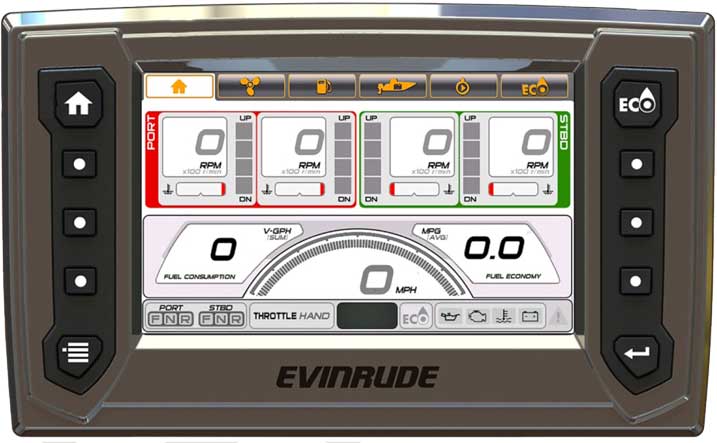
Evinrude ICON Touch 7.0 CTS Display With the revealing of their new outboard engine, the E-TEC Generation Two or E-TEC G2, Evinrude also introduced a completely new electronic instrument display for use with the new engines, the ICON Touch 7.0 CTS Display. The ICON Touch display is a color, wide screen, touch screen display that is dedicated to engine instrumentation. The ICON Touch display also provides for many new features in the set-up, operation, and diagnosis of the E-TEC G2 engines. The ICON Touch communicates with the E-TEC G2 engine and with its ICON electronic remote controls using a NMEA-2000 network connection. It allows the operator to control several helm functions, to select remote control devices, select modes of operation, and to perform calibration functions. The display is a 7-inch wide-screen color display with touch screen, and presents 800 x 480 pixels. The display is designed for good visibility in sunlit conditions and can be viewed with polarized glasses. The touch screen uses capacitive technology, and will not work well with gloved hands. The ICON Touch display does not contain its own GNSS receiver. A GNSS receiver on the NMEA-2000 network is needed for many of the measurements or data presented. Similarly, if speed over water data is desired, an external paddlewheel sensor is needed. Measurement of tank fluid levels also requires external sensors. The ICON Touch can be configured to use various units of measurement: --U.S.A units --Metric units --Imperial units --Nautical units (for depth and speed) The display can also be configured for choice of language for its presentation: --English --French --Spanish --Italian --German Operation of the ICON Touch display is accomplished with ten physical pushbutton switches that flank the touch screen display. The physical buttons are also supplemented with on-screen virtual buttons that can be actuated by touching the screen. System configuration menus provide for setting the number of outboard engines (up to four), the transom position of each outboard, and for selection of the throttle control (hand or foot).
SCREENS
The Status Bar always presents the following data:
The HOME screen presentation varies with the number of engines on the vessel. For multiple engines, the engine speed in RPM, the coolant temperature, and the trim position are shown for each engine. The speed over ground, total fuel consumption per hour, and instantaneous MPG are also shown. (See illustration above for the HOME screen and four-engine configuration.) For a single engine, a simplified screen shows RPM, trim position, speed over ground, and water pressure. The DIAGNOSTIC screen provides access to active and historical engine faults stored in the engine management module (EMM) of the E-TEC engine or engines. Previously this information was only available with use of the EV-Diagnostics software executing on laptop and connected to the diagnostic port of the engine. The ICON Touch 7.0 CTS display carries on the tradition of the ICON Pro RPM gauge in allowing calibration of the E-TEC engine Trim setting. It also includes calibrations for fluid tank level sensors, a function in both ICON Pro and I-Command gauges. The ICON Touch breaks new ground in being able to query the E-TEC EMM and retrieve active and stored faults. In addition, the ICON Touch display can show descriptive text explaining the fault codes. The ICON Touch can also configure several engine settings, such as the amount of effort for the power steering, the selection of a foot throttle or a hand throttle, and engaging or disabling the Trim Assist Mode. Although the ICON Touch was designed with the Evinrude E-TEC 74-degree V6 engines--the E-TEC G2--it will also be able to work with the E-TEC first generation engines. Some configuration functions and controls will not be operable with the older engines, but the ICON Touch display will show all the standard NMEA-2000 engine parameters being sent by the E-TEC first-generation engines. The ability of the ICON Touch 7.0 CTS display to communicate with the engine management module (EMM) of the E-TEC engine via its NMEA-2000 network connection is reflective of a new approach to EMM communication in general in the new E-TEC 74-degree V6 (or G2) engines. The EMM in a new E-TEC engine is accessible via a network connection. Further, in multiple engine installations, the EMM of all engines can be accessed via the network using just one connection to the network. In this way the ICON Touch can adjust settings on each engine, as well as show active or stored faults from each engine, just by being connected to the network. This approach to EMM communication via a network instead of a dedicated diagnostic connection is a significant change in the method of communication with the EMM. This will also be reflected in the EV-Diagnostic software. The laptop or computer executing the diagnostic software will not connect to an E-TEC G2 via a separate diagnostic connector, but will, instead, connect to the network using a new network-to-USB electrical interface. With one connection to the network, multiple engines on a vessel can be accessed by the diagnostic software. ICON TOUCH 4.3 CTS and ICON 3.5C DISPLAYS In addition to the ICON Touch 7.0 CTS touch display, there are also the ICON 4.3-inch color display and a ICON 3.5C color display. The ICON 3.5C color display can mount in the standard tachometer gauge hole, and can only be used with single engine installations. If you need more information about the new ICON TOUCH 7.0 CTS, ICON TOUCH 4.3 CTS, and ICON 3.5C displays, Here are links to those resources: ICON 3.5C Display User Guide ICON Touch 4.3 CTS Display User Guide ICON Touch 7.0 CTS Display User Guide The ICON 3.5C Display is not a touch-screen device. It has five hardware buttons which can perform various functions as indicated by on-screen labels. The ICON 3.5C Display can only be used with a single engine. The other models can be used with multiple engines. It does not appear that these touch screen displays provide the user with some sort of editor that allows the user to make changes to the layout or design of pages that present the a touch-screen interface: A touch-screen display is quite different from a non-touch screen display. With a non-touch display, the data on the display is generally just information being displayed to the user. It seems common these days to be able to edit or customize the presentation, that is, to move or drag graphic elements around the screen area to position them where desired. When the display becomes a touch-screen, this ability to modify the presentation becomes more difficult. A touch-screen display is also an input device. The area of the display that presents a graphic representation of a button that can be pushed, for example, must also include a mapping of the location of that button in the screen to the touch-screen part of the display so it can detect when the user touches the screen in that region. This means there are two layers of mapping on the screen: --the position of graphics on the screen that represent an input device in some form, and --the position of the touch-screen interface boundaries that correspond to that graphic and its position. In consideration of the dual mapping, it seems somewhat understandable that providing an editor for the user to modify the presentation as he desires might be a bit more difficult than just moving around some graphics. A further problem in accomplishing the editing of the screen is the recognition that, if allowed, a user might re-map the location of the button that signifies the changes are to be saved. At that point, where does the user press on the touch screen to activate the interface button? On the old location? Or the new location? It seems reasonable that one might have to run the editor on another device, say a workstation, to compose the new versions of the screen. Then save the changes to a file which would then be uploaded to the touch-screen devices. It also seems like providing an editor for a touch-screen user interface might expose the device to having to make changes to the lower-levels of its operating system while those systems were running. I am not a designer or engineer of touch-screen interfaces, but I can see that providing users with a means to edit the presentation, move elements around, and change the location of graphics on a touch screen display may be more complicated than with screens that are just displays and not user-input devices. WIRING DETAILS The electrical circuit on the ICON 7.0 CTS display connector called NAVIGATION LIGHT is an input signal. The NAVIGATION LIGHT circuit is connected to the external 12-Volt circuit controlling the vessel navigation lamps. When the circuit is powered, the ICON 7.0 CTS display interprets this input as indicative of night lighting conditions, and adjusts the backlight of the display to a night mode of illumination. This is explained on the folio marked "32" in the User's Guide. |
| jimh |
posted 05-24-2015 07:57 AM ET (US)
My remarks above are rather lengthy and perhaps obscure one very important feature that is being introduced by Evinrude in the ICON Touch 7.0 CTS display--a feature that deserves more emphasis. With the Evinrude ICON Touch 7.0 CTS display, the active and stored engine fault codes can be shown, and descriptive text for each fault code is provided. Instead of an LED being illuminated that indicates to the operator a fault has occurred, which, in the past could only have been resolved to a particular fault code by connecting the engine to a terminal executing proprietary diagnostic software, the new ICON Touch 7.0 CTS display can show the alarm, the specific fault, and the descriptive text for that fault code. And historical faults are also available. You can see the fault code history for the engine. This was previously possible only with the external terminal and diagnostic software. |
| Whaler_bob |
posted 05-26-2015 10:23 AM ET (US)
Nice writeup Jim! Good to see that BRP is actively introducing new hi-tech accessories to their line. Many of the current breed of seven-inch or larger multi-funtion displays are able to read engine NMEA 2000 data, but being able to display current and historic engine fault codes will set the BRP displays apart from the Garmin, Lowrance, Simrad, etc. MFD's.
|
| jimh |
posted 05-27-2015 08:51 AM ET (US)
Another feature of the Evinrude ICON Touch 7.0 CTS display that deserves a second mention is the ability of the display to alter settings in the E-TEC G2 engine. Using the display, the boat operator can make adjustments to parameters in the E-TEC G2, as follows: --select the amount of power steering boost that will be applied --select the profile to be used for the iTrim automatic engine trim feature --engage or shut off the iTrim feature --select which throttle control device will be used, such as changing to a pedal throttle from a conventional top-mounting throttle --initiate a self-oiling procedure to prepare the engine for long layup periods, or "winterization." |
| |
Powered by: Ultimate Bulletin Board, Freeware Version 2000
Purchase our Licensed Version- which adds many more features!
© Infopop Corporation (formerly Madrona Park, Inc.), 1998 - 2000.